cimbar-bigfile
| 中文 | English |
🚀 Try online: Sender · PC Receiver · Reassemble · Offline download
cimbar-bigfile
An optical large-file transfer tool built on top of sz3/libcimbar — break past the single-stream wirehair capacity ceiling (~40.5 MB hard cap in Mode B) by running multiple fountain streams in parallel, enabling 100+ MB file transfers (~1.2 GB theoretical single-session ceiling, see manifest-spec) in fully air-gapped environments.
What is this?
cimbar-bigfile is a pure HTML/JS wrapper around libcimbar that splits large files into chunks (default 10 MB — libcimbar author recommends 10-15 MB as the sweet spot, leaving redundancy headroom), encodes each chunk as an independent fountain-code stream (distinct encode_id), and plays them back as a colored-barcode animation on the screen.
The receiver uses sz3’s CameraFileCopy (CFC) Android app to scan; CFC’s built-in fountain_decoder_sink already supports concurrent per-encode_id bucketing natively, so no app modifications are required. Once all chunks are received, open the reassembly page in any browser, drop the files in, and the original file is reconstructed.
[Sender send.html]  →  on-screen animation  →  [Phone CFC]  →  N saved chunks  →  [Reassemble reassemble.html]  →  original file
[Sender send.html]  →  on-screen animation  →  [PC Receiver recv.html (camera or screen capture)]  →  auto reassemble + download
Usage
Setup
- Receiver (pick one):
- PC Receiver (new in this repo, no-phone option): double-click
recv.standalone.html(self-contained single file, no network needed) and either point a webcam at the sender’s screen or use screen/window capture to grab the sender window directly (see PC Receiver below) - Phone: install CameraFileCopy (F-Droid / Google Play / GitHub Release APK)
- PC Receiver (new in this repo, no-phone option): double-click
- Sender: open
send.standalone.htmlin a desktop browser (self-contained single file, no network needed, recommended) - Reassembly: only needed for the phone flow; the PC Receiver reassembles automatically. Open
reassemble.htmlin any browser (zero-dependency vanilla JS, no network needed)
You can also use the modular
send.html/recv.html(development builds), but they require a local HTTP server (see Development below) — browsers block wasm loads under thefile://scheme. The standalone builds are simpler for end users.
The sender, receiver, and reassembly pages default to English. Use the 中文 / EN button in the top-right corner to switch languages at any time; the browser remembers your choice across refreshes and future visits.
PC Receiver (recv.html)
No phone? A desktop browser can act as the receiver: recv.standalone.html embeds the libcimbar wasm decoder (reuses the vendored recv-worker for extraction + main-thread fountain decoding with native multi-stream bucketing). Once every part has arrived it verifies SHA256s, reassembles, and downloads the original file automatically — no need to move files anywhere.
Two capture sources
| Source | Use case | Notes |
|---|---|---|
| 📷 Camera | Between two devices (the other computer/phone plays the animation) | Aim at the sender’s screen; keep it steady with good light |
| 🖥️ Screen / window capture | Same computer (sender window + receiver window side by side) | Pick the sender window; keep it visible and never minimize it (window capture tolerates partial occlusion, but a minimized window stops producing frames) |
Usage
- Double-click
recv.standalone.htmland wait for “WASM decoder ready” - Click
📷 Cameraor🖥️ Screen / window; screen capture opens the browser picker — select the sender window - The page shows live active-stream progress; once the manifest arrives it lists the expected files with a per-chunk ✓ status
- When every chunk is in, it reassembles, verifies, and downloads the original automatically (each part also has its own ⬇ download button for backup / resend debugging)
Like CFC, the receiver window must stay visible: browsers throttle callbacks for hidden pages and decoding stops. A short occlusion is fine — an rVFC watchdog switches to an rAF fallback path automatically.
Phone CFC users: see Receiving / Reassembly below; the PC Receiver already covers both.
Sending
- Open
send.standalone.html - Drop the file you want to transfer onto the page
- Click “Start” (“开始传输” in Chinese) — the screen begins playing the colored-barcode animation
- Keep the screen still until all chunks are sent
You can also collect ad-hoc content on the sender page before sending:
Ctrl+Vpasted text becomes a stagedclipboard-*.txtfileCtrl+Vpasted files, or “Add files” / “Add folder”, appends items to the staged list- With one ordinary file or one pasted text item staged, the button reads “Start transmission” and sends the original file directly
- With multiple files, or content selected through “Add folder” (even if the folder contains only one file), “Pack and start” creates a local
cimbar-bundle-*.tararchive and sends it through the normal flow
When packing is needed, it stays fully local in the browser; nothing is uploaded. The received result is an uncompressed cimbar-bundle-*.tar that must be extracted with Windows tar, 7-Zip, or a similar tool. Content selected through “Add folder” follows this rule even when the folder contains only one file.
💡 Speed up reception: jump · lock · confirm-saved
In multi-chunk mode (large files), the sender UI switches to a three-column responsive layout: left = jump list, center = cimbar code canvas, right = ✅ confirm-saved button + progress panel.
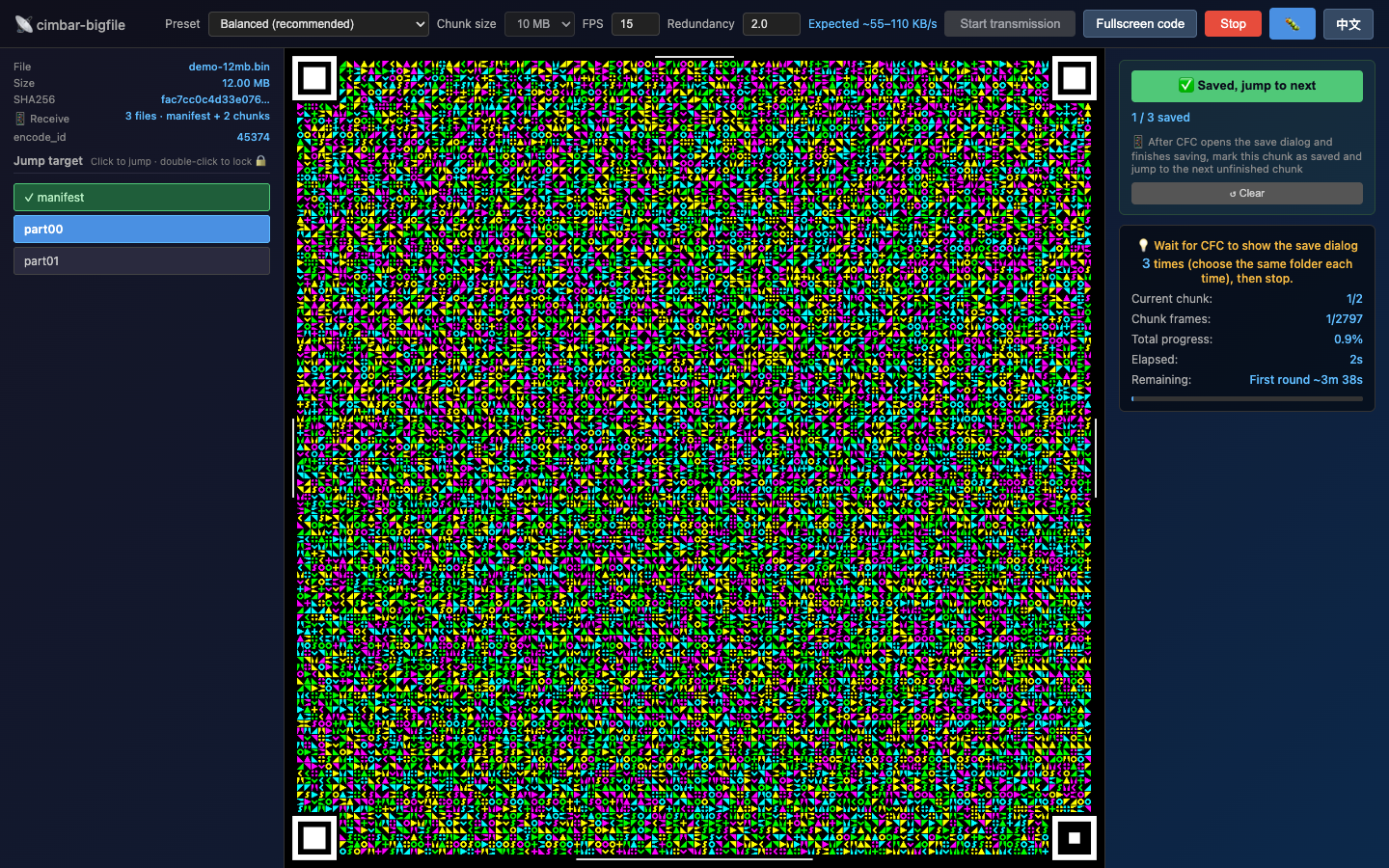
The default sender behavior cycles manifest → part00 → part01 → ... → loop back to manifest, and CFC happens to scan whichever chunk is currently on-screen — total scan time for a 100MB file is roughly ~55 minutes.
Three controls eliminate the wait:
| Action | Effect | Trigger |
|---|---|---|
| Single-click a chunk button | Jump to that chunk immediately (clears any lock, resumes free loop) | Mouse click / Tab + Enter |
| Double-click a chunk button | 🔒 Lock to that chunk (sender stays on it, fountain keeps emitting new frames, CFC’s next scan is guaranteed to land on it); double-click again or click another = transfer / unlock | Mouse double-click / Tab + Shift+Enter (keyboard equivalent) |
| ✅ Saved, jump to next (green primary button in right panel) | Mark the current chunk as saved (persisted to localStorage) + auto-jump to the next unsaved chunk | Click it after CFC’s “save where” dialog completes |
Button visual states (left column in screenshot):
- 🟢
✓ prefix + green background= confirmed saved - 🔵
blue background= currently playing on screen (active) - 🟡
amber tint + 🔒= double-click locked; the progress panel mirrors this as “🔒 Locked partXX · refill N rounds”
Expected gain: scan time for a 100MB file drops from ~55 min to ~17 min (random-scan wait eliminated).
simpleMode (small files ≤ chunk size, single-stream direct send) hides the jump list — there is only 1 stream, so jumping is meaningless.
🔍 Full-screen scanning
After transmission starts, click “Fullscreen code” (“全屏显示码图” in Chinese) to enlarge the cimbar code to fill the screen, making it easier for the phone camera to focus and scan. Full-screen mode hides the side panels but keeps a status bar outside the code image. Large transfers enter guided lock: the sender locks the current (or next unfinished) chunk, keeps emitting refill frames, and shows the current chunk, total chunk count, saved count, and a “✅ Saved, lock next” button. The status bar stays visible so a chunk cannot change while the phone’s save dialog is open and then be marked incorrectly.
- Press
Escor click the floating exit control to return to the normal layout - After CFC saves the current chunk, confirm it in the full-screen status bar; the sender switches to and locks the next unfinished chunk
- After every chunk is marked saved, the status bar says the transfer can stop and disables further confirmation
- The guided-lock status bar stays visible; move the pointer or focus a control with the keyboard to reveal the auto-fading exit control
- Exiting full-screen releases a lock added by guided mode; a manual lock that existed before entering is preserved
- Stopping the transmission automatically exits full-screen mode
Receiving (phone CFC)
PC Receiver users skip this section:
recv.htmlhandles reception and reassembly automatically (see PC Receiver).
- Open CFC on the phone, point it at the desktop screen
- After each chunk completes, CFC shows a “save where” dialog
- Always pick the same directory (recommended: create a
cimbar-bigfile-job1/folder) - After all chunks are received:
- Small file (≤ chunk size, default ≤ 10 MB): a single file with the original filename — no reassembly needed, what CFC saved IS the original file
- Large file (> chunk size): N+1 files —
manifest.json+<filename>.part00.bin…<filename>.partNN.bin— proceed to reassembly below
If the transmitted payload is
cimbar-bundle-*.tar, it must still be extracted after direct reception or after large-file reassembly.
Reassembly (large files only)
- Transfer all files from the phone to the desktop (USB / email / any method)
- Open
reassemble.htmlin a browser - Select all files and drop them onto the page
- SHA256 verification runs automatically → on success → the reconstructed original file is downloaded
The reassembly page also defaults to English and provides the same 中文 / EN language control. Switching languages does not clear selected files or reset the current verification state.
Known limitations
- CFC pops up a save dialog per chunk: at 10MB / chunk, a 100MB file requires 11 “save” taps (the PC Receiver
recv.htmlhas no such issue — fully automatic). - Throughput: about 106 KB/s (libcimbar Mode B default). 100MB files take an estimated 16-20 minutes.
- The receiver window must stay visible: the PC Receiver depends on live frame capture just like CFC; browsers throttle callbacks for minimized or fully occluded windows and decoding stops (brief occlusions are covered by the rAF fallback watchdog).
- Memory: the PC Receiver keeps all received parts in browser memory; for files of several hundred MB or more, watch browser memory pressure.
- Upstream web decoder still not recommended: libcimbar upstream v0.6.4 ships its own web decoder (this repo’s
vendor/cimbar-wasm-v0.6.4/recv.html), but it stalls mid-decode on larger files (≥ 3MB, see issue #4) and its single-stream design cannot consume this repo’s multi-stream chunked output. The root-levelrecv.html/recv.standalone.htmlin this repo is a rewrite: native multi-stream bucketing, slot released on completion, automatic reassembly — not the same page as upstream’s.
Troubleshooting
| Symptom | Likely cause | Fix |
|---|---|---|
| CFC scans nothing | Screen too dim / wrong distance | Max screen brightness, hold the phone 10-30 cm away |
| CFC scans very slowly | Frame rate too high for the camera | Lower send.html FPS to 10-12 |
| Some chunks never arrive | Insufficient fountain redundancy | Raise the “redundancy” slider in send.html to 2.0 or higher so the sender emits more frames per chunk |
| Reassembly SHA256 fails | A chunk was corrupted in transit | Identify the failing chunk → resend it (restart send.html with the same encode_id_base and jump to that chunk) |
| PC Receiver gets nothing | Camera misaimed / out of focus; window capture picked the wrong source | Aim at the sender’s screen (10-30 cm, max brightness); for window capture confirm the sender window is selected |
| PC Receiver stalls midway | The receiver window was minimized / fully occluded | Keep the window visible; brief occlusions recover automatically (watchdog switches to rAF) |
| Browser fails to load wasm | file:// CORS blocked (only the dev send.html/recv.html have this issue) |
Use the *.standalone.html builds (just double-click), or run a local HTTP server: python -m http.server 8000 |
| Garbled filename | System encoding mismatch | manifest enforces UTF-8 — check browser/phone system encoding |
| Browser stutters | File too big, wasm heap pressure | Lower the chunk size (default 10MB → 5MB) |
| Total scan time too long | CFC resets fountain state per save, so the sender’s looping makes hits luck-based | Use the new “jump buttons” to manually pin the next target chunk (see “Speed up reception” above) |
Performance reference
Reference rig: 1080p screen + Pixel 5 + default settings (Mode B / 15 fps / 10 MB chunks / 2.0x redundancy)
| File size | Chunks | Save dialogs | Estimated time | Throughput (Mode B) |
|---|---|---|---|---|
| 5 MB | 1 chunk (direct, no manifest) | 1 | ~1 min | ~85 KB/s |
| 28 MB | 3 chunks | 4 (manifest + 3 parts) | ~4-5 min | ~100 KB/s |
| 100 MB | 10 chunks | 11 (manifest + 10 parts) | ~16-20 min | ~106 KB/s |
Verification coverage: 5 MB (bundled
test/test-5m.bin) + ~28 MB (manual end-to-end optical link) + 100 MB (application-layer round-trip viascripts/test-round-trip-100mb.js). Other sizes extrapolate linearly.Actual throughput depends heavily on lighting, screen brightness, and camera autofocus stability.
Choosing a redundancy multiplier
The libcimbar author confirmed in a sz3/libcimbar#165 comment that “no penalty for redundant blocks (e.g. 3x or 4x for 10 MB chunks)” — which follows from how fountain code works:
- Redundancy only affects how many frames the sender emits in total, not how many CFC needs to finish decoding (CFC stops once it has enough independent frames)
- Surplus frames are silently ignored by CFC, so they don’t waste receive time
- High redundancy’s real value: a thicker safety margin when the first sender loop doesn’t deliver every chunk cleanly
| redundancy | Use case |
|---|---|
| 1.2-1.5x | Tripod-mounted screen + good lighting + stable focus (aggressive preset) |
| 2.0x (default) | Normal indoor lighting + handheld but steady (balanced preset) |
| 3.0-4.0x | Poor lighting / glare / visible hand-shake (conservative preset) |
The sender UI’s redundancy input goes up to 5.0x for extreme conditions.
Advanced: files larger than ~1.2 GB
A single session is bounded by wirehair’s uint16_t encode_id slot — chunk_count should stay under ~120 (≈1.2 GB at 10 MB/chunk). The libcimbar author noted two ways to push past this in the sz3/libcimbar#165 comment, both requiring manual babysitting:
Option 1: vary the chunk size and restart the session
“Provided you’re finished sending a chunk, you can re-use the encode_id if you slightly vary the chunk size… (e.g. 10.01 MB chunks after the first go around)”
Ship the first ~1.2 GB with 10 MB chunks; restart the sender for the remainder with a slightly different chunk size (e.g. 10.01 MB or 10.5 MB). wirehair treats the different chunk size as a new file, so old encode_id slots are not re-used.
Option 2: restart the CFC decoder to clear its cache
“you can also restart the decoder to clear its cache of ‘done’ files, which will have the same effect without changing the chunk size”
Fully restart the CFC app — its fountain_decoder_sink cache of “done files” is wiped, freeing the encode_id slots. Any partial progress from the previous round is also lost, so this only fits “all chunks of the previous round were saved successfully, now starting a fresh round” scenarios.
⚠️ Neither option is automated inside cimbar-bigfile yet — both require manual user intervention. Arbitrarily large transfers are theoretically possible; the largest end-to-end verified size is currently 100 MB (see the performance table above).
Development
Updating the libcimbar dependency
See vendor/README.md “Updating to newer libcimbar release”.
Protocol specification
- docs/manifest-spec.md — manifest JSON field semantics
- docs/architecture.md — data flow, wasm API, design decisions
Local sender / receiver testing
# Run a local HTTP server (avoids the file:// CORS issue)
python -m http.server 8000
# Visit http://localhost:8000/send.html (sender)
# Visit http://localhost:8000/recv.html (PC receiver)
wasm pipeline test
scripts/pipeline-test.html is a development test page that runs the full data path in a browser: encode → canvas render → extract → fountain decode → multi-stream bucketing → reassemble + SHA256 verification (no optical link involved). Serve it over a local HTTP server and open http://localhost:8000/scripts/pipeline-test.html; the page logs PASS on success. It also exposes window.__pipeline helpers for driving by automated tests.
Capture regression tests
Run node --test scripts/test-recv-capture.js to check stop/restart behavior, delayed frames, worker replies, watchdog transitions, and pixel format/dimension consistency. These tests use controlled browser API substitutes; camera focus, lighting, and optical transfer performance still need device testing.
Building the self-contained single-file builds
send.standalone.html and recv.standalone.html are the “double-click and go” builds for end users — vendor wasm + glue js are base64-inlined into the HTML so the pages no longer need an HTTP server. Rebuild every time the vendor is upgraded:
PYTHONIOENCODING=utf-8 PYTHONUTF8=1 python scripts/build-standalone.py
# Output: send.standalone.html (~2.6 MB) + recv.standalone.html (~5 MB)
The build script reads send.html / recv.html + vendor/cimbar-wasm-v0.6.4/cimbar_js.*.js + cimbar_js.*.wasm + recv-worker.*.js and emits the standalone files at the repo root. It replaces the <script src="vendor/..."> tag with an inline <script> that base64-decodes into Module.wasmBinary, which the emscripten glue detects and uses instead of fetching. recv.standalone.html additionally packages the decode worker as a blob worker (file:// workers cannot importScripts; the wasm is injected as Module.wasmBinary there too).
Architecture & protocol
- Protocol spec: docs/manifest-spec.md
- Architecture diagram: docs/architecture.md
License & Acknowledgements
cimbar-bigfile is a thin wrapper around libcimbar. This repository is jointly governed by three licenses: MIT, MPL-2.0, and BSD-3-Clause:
| Component | License | Copyright | Notes |
|---|---|---|---|
send.html / recv.html / reassemble.html / scripts/* / docs/* and other original project code |
MIT | © 2026 peipei | See LICENSE |
vendor/cimbar_js.html / vendor/cimbar-wasm-v0.6.4/* |
MPL-2.0 | © sz3 (libcimbar) | See vendor/LICENSE-libcimbar |
| The wirehair fountain-code library embedded in the wasm above | BSD-3-Clause | © 2018 Christopher A. Taylor | See vendor/LICENSE-wirehair |
| The CFC Android receiver (installed independently by the user, not vendored) | MIT | © sz3 | See github.com/sz3/cfc |
MPL-2.0 source obligation: this project distributes the libcimbar wasm binary (Executable Form). Per MPL-2.0 §3.2, the corresponding source code is freely available at https://github.com/sz3/libcimbar/tree/v0.6.4.
Acknowledgements
- sz3/libcimbar — core fountain code + cimbar codec engine
- sz3/cfc — Android receiver app
- catid/wirehair — underlying fountain-code library